Accumulator

Use the Accumulator tool in conjunction with other tools to accumulate values and then proceed to another action.
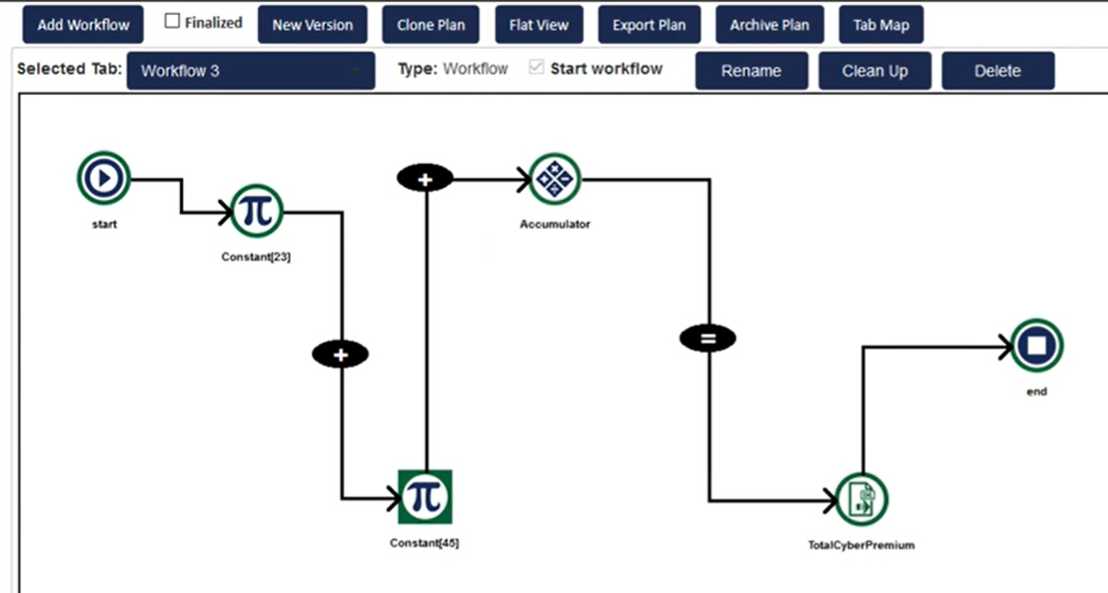
- Place the Date Convert tool in your workflow after assembling various data items downstream. For example, if you want to add multiple items together, place the data items on your workflow and connect them with the Add (+) Connect option from the context menu (right-click > Connect > plus symbol). See the image in the Use Case section below for an example.
- Right-click the Accumulator icon to expose the context menu.
- Select Properties to expose the properties dialog.
- If you choose, you can change the name of the tool in your workflow to something more descriptive for your purposes. You can also keep the default name of the tool.
- Click OK.
Use Case
The Accumulator is used in a workflow as a gathering tool for multiple values. In the sample workflow below, the Accumulator tool is part of an addition sequence.